
Inspect the source wireframe
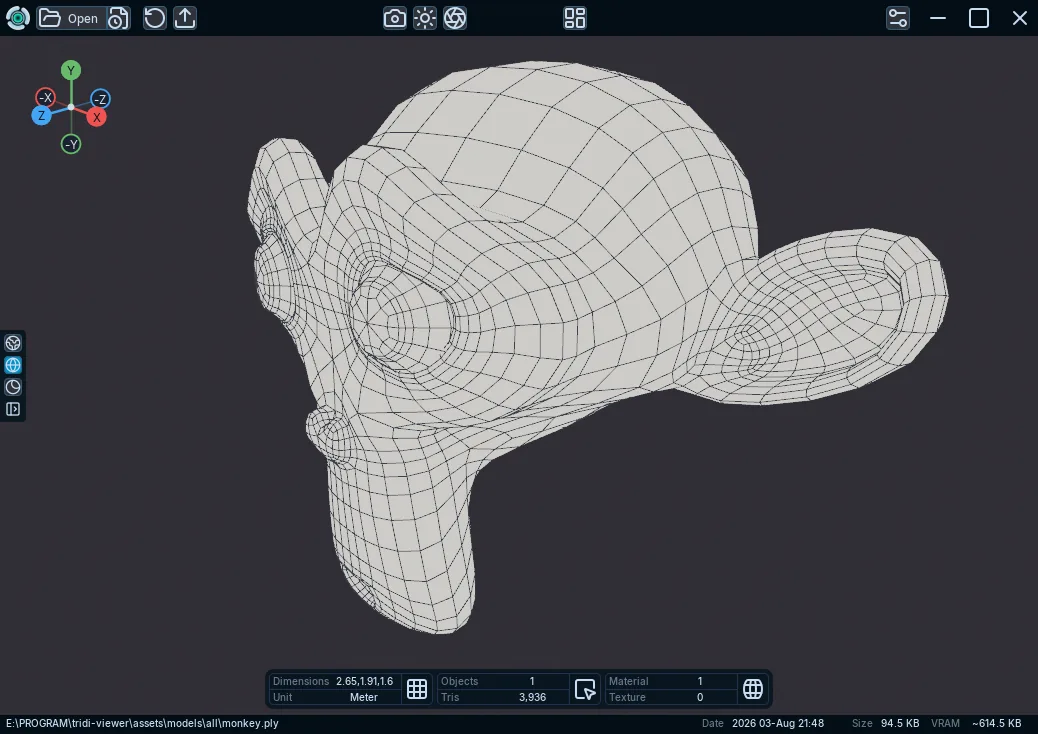
Use Solid Wireframe to inspect sharp source polygon edges available in an imported 3D model.
Applies to Tridi 1.6.0 release. Release notes
Solid Wireframe helps you review the polygon edges retained from the source asset.
Show the wireframe
- Open a model.
- Find the render controls at the side of the viewport.
- Select Solid Wireframe, or press Z.
What to expect
Polygon sources can retain non-triangular edges. Triangle-authored glTF and STL files show their triangle edges. Visibility changes made in the Objects panel also apply to the wireframe.
Solid Wireframe uses a dedicated screen-space anti-aliased overlay so source topology remains sharp without being softened by the main shaded-view post-processing.
Limitations
Tridi does not invent missing source topology. An importer can degrade to triangle topology with a warning when usable source-polygon topology is unavailable, or reject geometry that cannot be represented safely.